
TaskbarToDock 2.3.0
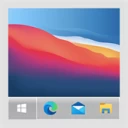
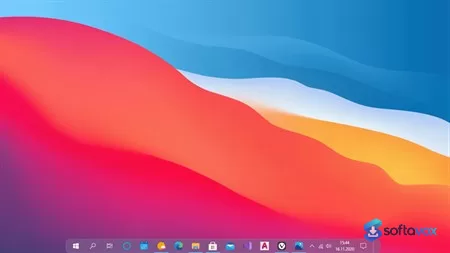
TaskbarToDock is a small utility by developer Valaut that centers your Windows 10 or 11 taskbar and auto-hides it to mimic the macOS dock aesthetic. It dynamically resizes based on open programs and adapts its color to your Windows theme, with Windows 11 support for themes and transparency. However, it's not a real dock, it lacks magnification, drag-and-drop rearrangement, running-app indicators, and folder stacks. At $2.79 on the Microsoft Store, it charges for a job that free tools like TaskbarX, RocketDock, and Winstep Nexus have done for years with more features. Windows 11 users may also face startup issues requiring admin mode, Developer Mode, and additional library installations. Free alternatives offer better dock experiences with no price tag.
- Free trial
- Windows
- Nov 12, 2026
Screenshots
About TaskbarToDock
TaskbarToDock Download, Center Your Windows Taskbar Like a Mac Dock
TL;DR Quick Take / Who is this for?
TaskbarToDock is a tiny Windows personalization utility that does one thing: it takes the standard Windows taskbar, centers the icons, and adds dock-like behaviors such as automatic hiding based on window sizes and dynamic resizing based on how many programs are running[reference:0][reference:1]. It is aimed at users who like the visual aesthetic of macOS, specifically the centered, floating dock, but want to keep using Windows. The app is not free; it costs around $2.79 on the Microsoft Store, though a free trial is available to test whether the effect works for you[reference:2]. The trade-offs are important to understand. Independent reviews and user discussions point out that TaskbarToDock is a cosmetic tweak, not a full dock replacement. It centers and auto-hides the existing taskbar, but it does not add the launcher features or the magnification effects that make a real macOS dock feel like a dock[reference:3]. Some users also report difficulty figuring out how to configure it after purchase[reference:4]. TaskbarToDock is the right pick for Windows users who want a simple, low-cost way to get a centered, auto-hiding taskbar without installing a full desktop environment replacement. It is not the best choice for anyone expecting a complete macOS dock experience, or for users who need extensive customization options.
Quick Info Box
| License Type | Paid (approx. $2.79; free trial available) |
|---|---|
| File Size | Small utility (exact size varies by version) |
| OS Compatibility | Windows 10 and Windows 11 |
| Latest Version | 1.0 (as listed on Softavox) |
| Developer | Valaut |
Key Features & Real-World Usability
TaskbarToDock’s feature set is narrow by design, and that is the point. It does not try to replace the Windows shell; it modifies the existing taskbar to behave more like a dock. The core function is centering the taskbar icons, which is the most visible change and the main reason people buy it[reference:5]. Beyond centering, it adds automatic hiding of the taskbar based on the size of open windows, which reduces visual clutter when you are working in a maximized application[reference:6]. The app also includes dynamic resizing of the taskbar depending on how many programs are pinned or running, so the dock can grow or shrink as your workflow changes[reference:7]. Theme-aware color changes are another feature: the panel adjusts its color based on the active Windows theme, which helps it blend in rather than standing out as an inconsistent overlay[reference:8]. Windows 11 support is included, along with multiple themes to choose from, giving you some control over the look beyond the default behavior[reference:9]. The limitations are equally clear. TaskbarToDock is a taskbar modifier, not a launcher. It does not add a launchpad, stacks, or the magnification effect that defines the macOS dock experience. A 2026 comparison of dock alternatives concludes that TaskbarToDock “centres the Windows taskbar and calls it a Mac dock, but it stops short of a real launcher” and that it “changes how the taskbar sits, but it does not add the things that make a dock a dock”[reference:10]. Configuration is also not always intuitive. At least one user reported buying the app and then struggling to figure out how to use it, even after visiting the developer’s website[reference:11]. The feature set is small enough that there is no learning curve for the core function, but there is also no documentation-heavy onboarding.
- Centered taskbar: Moves the Windows taskbar icons to the center of the screen, mimicking the primary visual characteristic of the macOS dock.
- Auto-hide based on window size: Hides the taskbar automatically when windows are maximized or sized in a way that would otherwise overlap it, reducing clutter.
- Dynamic resizing: Adjusts the width of the taskbar based on the number of pinned or running programs, so the dock can expand or contract with your workflow.
- Theme-aware colors: Changes the panel color to match the active Windows theme, helping the dock feel integrated rather than bolted on.
- Windows 11 support: Compatible with both Windows 10 and Windows 11, with multiple themes available for the dock appearance.
- Low-cost one-time purchase: A small one-time fee (around $2.79) with a free trial, making it an inexpensive experiment for users curious about a centered taskbar.
Pros, Cons & Community/User Feedback
User feedback for TaskbarToDock is limited and scattered, which is itself a consideration. There is no large body of reviews on major software review platforms. The available commentary comes from download portals, tech news coverage, and forum discussions. On the positive side, the core concept is easy to understand and the price is low. MSPowerUser describes it as a small app that creates a taskbar similar to the macOS Dock, and notes that at $2.79 it is “probably half the price of your latte” and comes with a free trial[reference:12]. Softavox’s listing summarizes it as a personalization tool that “changes your Windows taskbar to look more like the dock on a Mac computer,” and notes that it works on Windows 11 with multiple themes available[reference:13]. For users who simply want a centered, auto-hiding taskbar, the app delivers that specific effect, and the free trial allows you to verify the behavior before paying. The complaints are more specific. The most substantive criticism comes from a 2026 comparison of dock alternatives, which argues that TaskbarToDock is a cosmetic trick rather than a true dock replacement. It notes that the app “stops short of a real launcher” and that it does not add the functional elements, launchpad, stacks, magnification, that make a dock genuinely useful for launching and switching between apps[reference:14]. This is a fair limitation: if you expect a full macOS-like dock, you will be disappointed. A second complaint is usability. A forum post from a user who purchased the app describes being unable to figure out how to use it, even after visiting the developer’s website[reference:15]. That suggests the onboarding is minimal and users who are not comfortable experimenting may struggle. A third consideration is download safety. A Chinese-language technical Q&A answer warns that downloading TaskbarToDock from non-official channels can result in tampered or bundled versions, and recommends obtaining the latest signed version from the official source and running it with administrator privileges[reference:16]. That is a general warning about third-party downloads rather than a specific malware report, but it is a relevant caution for any small utility that modifies the Windows shell.
Pros
- Centers the Windows taskbar for a cleaner, macOS-like visual layout
- Auto-hides based on window size, reducing desktop clutter
- Dynamic resizing adapts the dock to the number of running programs
- Theme-aware colors help the dock blend with the Windows theme
- Works on Windows 10 and Windows 11 with multiple themes
- Free trial available to test the effect before buying
- Low one-time price (around $2.79)
Cons
- Cosmetic tweak only, does not add a real launcher, stacks, or magnification effects
- Reported difficulty configuring the app after purchase
- Limited independent reviews and no large user feedback base
- Third-party downloads can be tampered with; official source is essential
- Requires administrator privileges to modify the taskbar
- Not a replacement for a full dock or desktop environment tool
Final Verdict & Safe Download Advice
TaskbarToDock is a small, focused utility that delivers exactly what its name promises: a centered, auto-hiding taskbar that looks more like a macOS dock than the default Windows layout. If you are a Windows user who likes the visual idea of a centered dock and you are comfortable with a cosmetic tweak rather than a full launcher replacement, the app is inexpensive, the trial is free, and the core effect works on both Windows 10 and Windows 11. The caveats are real. It is not a true dock. It does not add the launcher, stacks, or magnification features that make a macOS dock functionally distinct, and at least some users have found the configuration unclear. If you want a full dock experience, you should look at more comprehensive alternatives. If you simply want a centered, auto-hiding taskbar and you are willing to pay a few dollars, TaskbarToDock is a reasonable experiment, provided you download it only from the official Microsoft Store listing or the developer’s official source, and you run it with the necessary privileges. For users who are happy with the default Windows taskbar or who want deeper customization, the built-in settings or a more feature-rich shell replacement will be a better fit.
- Download only from the official Microsoft Store listing or the developer’s official source: The app is distributed through the Microsoft Store at the URL in this review. Avoid third-party download sites, as a technical Q&A answer warns that non-official channels can deliver tampered or bundled versions[reference:17]. The Microsoft Store is the safest source for the signed package.
- Verify the app and developer before installing: The legitimate app is published by “Valaut” on the Microsoft Store. Check the publisher name on the listing before clicking Install, and avoid similarly named apps from unknown developers.
- Use the free trial to test compatibility and behavior: TaskbarToDock offers a free trial. Use it to confirm that the centered taskbar and auto-hide behavior work as expected on your specific Windows version and display configuration before paying the small purchase price.
- Run with administrator privileges if required: Modifying the Windows taskbar typically requires elevated permissions. If the app prompts for administrator access, grant it only if you obtained the installer from the official source. Do not disable security software to force an installation.
- Do not download “cracked” or “modded” versions: The app costs only a few dollars and has a free trial. Cracked builds of shell-modifying utilities are a high-risk category because they run with elevated privileges. The official trial and purchase are the only safe options.
Similar software



Key features
- Centered Taskbar, Moves icons to the middle of the screen for a balanced look
- Auto-Hide Functionality, Slides the taskbar out of view based on window sizes
- Dynamic Resizing, Adjusts width based on the number of open or pinned apps
- Theme Integration, Matches colors and styles to your current Windows theme
- Windows 11 Support, New themes, transparency controls, and Start menu transparency options
- Custom Taskbar Color, Available on Windows 10
- Free Trial, Test before buying
- Price, $2.79 on Microsoft Store (discounted to ~$1.48 in some regions)
Frequently asked questions about TaskbarToDock
Is TaskbarToDock safe?
Is TaskbarToDock free?
What does TaskbarToDock actually do?
What are the system requirements for TaskbarToDock?
How is TaskbarToDock different from a real dock like RocketDock or Winstep Nexus?
Why does TaskbarToDock stop working on Windows 11?
Versions
| Version | Release date | Platform | File size | |
|---|---|---|---|---|
| TaskbarToDock 2.3.0 Latest version | Oct 3, 2023 | Windows | Download |
Comments about TaskbarToDock
No comments yet. Share your experience with this program!